Quick Start
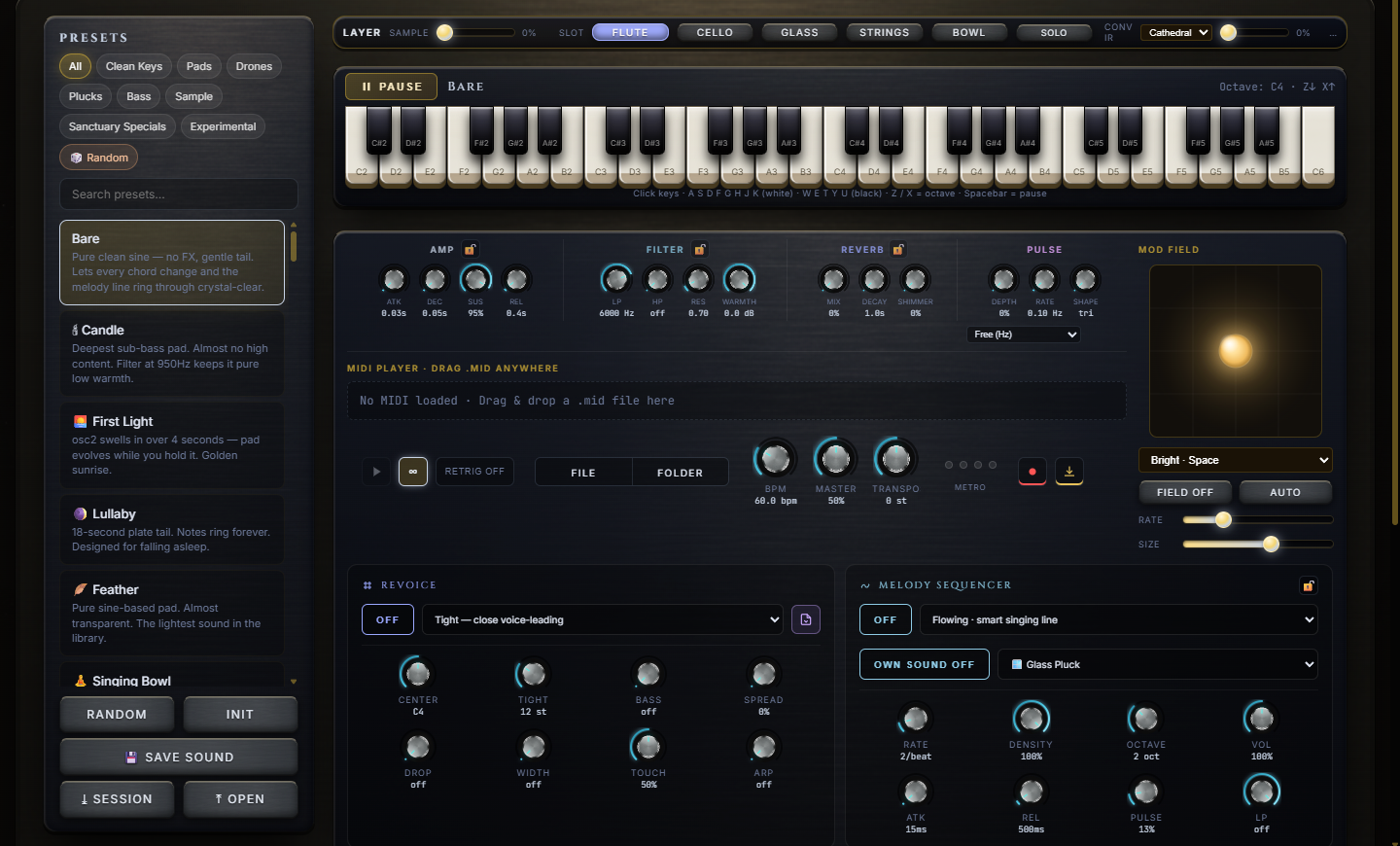
In the left rail, tap a category chip (Pads, Drones, Plucks…) and click any preset. Or hit Random.
Press A through K on your computer keyboard — white keys. W E T Y U are the black keys.
Presets & Sound Modes
The left rail holds the full preset library. Filter it with the category chips —
Clean KeysPadsDronesPlucksBassSampleSanctuary SpecialsExperimental
- Search — type into the search box to filter presets by name.
- Random / Init — Random jumps anywhere in the library; Init resets to a blank patch for sound design from scratch.
- Save — store your own tweaked patches as Custom presets, or download the whole session (sound + melody + revoice + mod field + loaded MIDI) as a .sanctuary file and reopen it anytime with ⤒ Open.
- Sample Layer — the gold strip above the keyboard blends a real recorded layer (Flute, Cello, Glass, Strings, Bowl) over the synth. SOLO mutes the synth to hear the sample alone, and the Conv IR picker drops everything into a Cathedral, Hall, Plate or Cave convolution reverb.
- Skins — the pill at the top-right cycles four visual themes (Sanctuary, Nocturne, Solar, Emerald). Keyboard shortcut: Shift+S.
Playing — Keyboard & Chords
- Computer keys — A S D F G H J K are white keys; W E T Y U are sharps. The row extends up through O L P ;. Hold several at once for chords.
- On-screen keyboard — click or touch the keys directly; they light as they play.
- Pause — the gold Pause button (or Space) mutes everything with a gentle fade and brings it back the same way. Nothing stops — your loop keeps its place.
- Hardware MIDI — click Enable MIDI in the left rail to play Sanctuary from any connected MIDI keyboard (Chrome / Edge).
- Piano Roll — expand the panel under the keyboard to edit the loaded MIDI by hand: click empty grid for a new note, drag to move, drag the right edge to resize, right-click to delete. Edits apply to playback, bounce and MIDI export.
The Melody Generator
The Melody Sequencer card writes an evolving melodic line over whatever chords are playing — switch it ON and pick its brain from 22 patterns across four families:
- ◇ Ambient — Stillness, Drifting, Breathing, Glasswork, Aurora. Long tones and sparse bells.
- ✦ Melodic — Flowing, Wander, Soaring, Celestial, Cascade, Ascension, Helix, Converge. Singing lines and rolling arps.
- ▲ Techno — Hypnotic, Pulse, Acid, Driver, Ratchet. Driving 16ths and euclidean stabs.
- ∴ Generative — Quantum, Euclid, Stardust, Gravity. Never quite repeats.
Shape it with the eight knobs — Rate, Density, Octave, Vol, Attack, Release, Pulse, Pulse Rate. The killer feature is OWN SOUND: give the melody a completely different preset than the chords (pads underneath, a pluck on top — instant two-voice arrangement). The 🔓 lock keeps your melody settings when you hop presets.
The Revoicer
Load any MIDI file — yours, a pack, anything — and the Revoice card re-voices its chords live, in Sanctuary's own voice. Five voicing styles:
- Tight — close voice-leading · Open — Frahm-style spread · Quartal — Eno drop-2 · Wide — cinematic octave spread · Cluster — dense ambient stack.
- ARP — arpeggiate the revoiced chords instead of playing them block-style, with six patterns (Up, Down, Converge, Diverge, Random, As Played).
- Sculpt knobs — Center, Tight, Bass, Spread, Drop, Width, Vel and Arp rate fine-tune the voicing in real time.
- Export MIDI — the ⤓ button on the card exports the result as a new MIDI file, revoicing included. Sanctuary becomes a chord-voicing tool for your DAW.
The Orb & Main Knobs
The glowing orb is the Mod Field — a living modulation source that slowly breathes movement into the sound. Drag inside it manually, or let it drift:
- Field styles — Bright · Space, Movement · Glide, 🌌 Aurora, ✨ Cosmos · Cathedral Shimmer, 🌅 Ember · Warm Body + Hall.
- FIELD ON / AUTO — enable the field, and let AUTO animate it on its own. RATE sets the drift speed, SIZE the depth of movement.
- Essentials row — the four always-visible knob clusters: Amp (envelope), Filter, Reverb (Mix / Decay / Shimmer) and Pulse. Each of the first three has a 🔓 lock — lock one and preset changes won't reset it.
- Deeper panels below unfold the full engine: oscillators, filter, LFOs, evolve, performance, mod matrix, step sequencer, morph and a granular layer that can load your own WAV/MP3 as a texture.
FX — Reverb · Chorus · Delay · BPM
- Reverb — the Essentials Reverb cluster (Mix, Decay, Shimmer) is the heart of the Sanctuary sound; shimmer adds the pitched-up halo. The Conv IR strip layers a second, convolution reverb (Cathedral / Hall / Plate / Cave) on top.
- Chorus · Phaser · Saturation — one collapsible FX panel for width and warmth.
- Delay · Reverb · Width · EQ — the second FX panel: tempo-aware delay, stereo width and tone shaping.
- BPM — the BPM knob in the transport row drives the melody sequencer, MIDI playback and bounce. The range deliberately reaches very slow (down into 5–20 BPM territory) for deep-ambient pacing.
- Master & Transpose — master volume and a transpose knob to shift any loaded MIDI into a different key, sit on the same row.
Loading MIDI — Files, Folders & Drag-and-Drop
- Drag & drop — drop a .mid file anywhere on the page. A "DROP MIDI" overlay catches it and it starts playing in the current preset.
- FILE — browse for a single .mid file.
- FOLDER — load an entire folder of MIDI files at once (a whole pack, for instance). A compact library bar appears with a searchable file list and ◀ ▶ arrows to step through files without touching the file picker again.
- LOOP / RETRIG — loop the file seamlessly, or retrigger it from the top on preset change.
- Everything you load runs through the Revoicer and the Piano Roll — load, revoice, edit, export.
Exporting Your Sound
- ● REC — live take — hit record, perform (play keys, ride knobs, morph the field), hit stop. You get a finished WAV with automatic fade-in/out baked in.
- ⤓ BOUNCE — offline render — the studio path. Choose bars (1–480), BPM and fade length, and Sanctuary renders a perfectly bar-synced, loop-ready WAV offline — no need to play it through in real time.
- Export MIDI — from the Revoice card, export the current (revoiced) chords as a .mid file for your DAW.
- ⤓ Session — save the entire state as a .sanctuary file: the patch, melody, revoice settings, mod field and MIDI all reopen exactly where you left them.
Pro Tips
- Instant Frahm — load any simple chord MIDI, set Revoice to Open, slow the BPM to ~50, pick a Clean Keys preset. Block chords become felt-piano-style voicings in seconds.
- Two-voice arrangements — chords on a Pads preset, then Melody Sequencer ON with OWN SOUND set to a Pluck. One page, two instruments, full track.
- Lock before you browse — lock Reverb (and Melody) before auditioning presets. Your space and your line survive every preset hop, so you're comparing sounds, not whole mixes.
- Stacking loops — Bounce 8 bars at a fixed BPM, swap presets, bounce again at the same settings. The WAVs are bar-locked, so they layer perfectly in any DAW — your own ambient sample pack in minutes.
- Feed it the packs — load a whole Aural Alchemy MIDI pack with FOLDER, then step through progressions with the ◀ ▶ arrows while Revoice + ARP run. It's the fastest idea generator in the app.
Get the MIDI packs Sanctuary loves
Hand-crafted ambient chord progressions, built to drop straight into Sanctuary's FOLDER loader — revoice them, arp them, bounce them. Or take the Serenity Suite and own everything, forever.
Serenity Suite owners get every pack — and every future one — free, for life.